 |
GPAL - Generally Positive Automation Library v1.0
GPAL The Fluent Automation LIbrary
|
|
GPAL - Generally Positive Automation Library v1.0
GPAL The Fluent Automation LIbrary
|
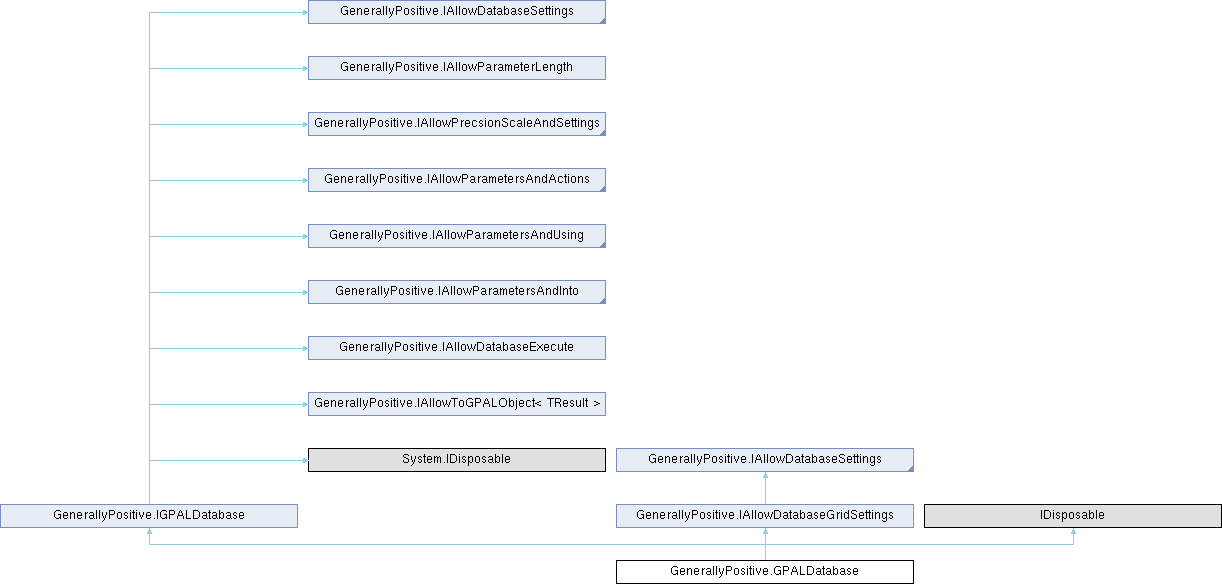
Class to define database usage. Currently only used for input from a table, sql or stored procedure.
Instantiated with GPAL.Database.
More...
Classes | |
| class | DatabaseError |
| What went wrong on the last call, and enough about it to act on. A failure hands the callback the database and nothing else, so everything it would need to ask about lives here: the server's own number for it, the sql that ran, the parameters it ran against, and which row of them was being written when it stopped. More... | |
Public Member Functions | |
| delegate int | CallOnError (GPALDatabase database) |
| IGPALDatabase | ToGPALObject () |
| Hands back the whole database, which is also how a chain gets from describing one to using one. Every setting answers with IAllowDatabaseSettings, which carries the settings and the parameter definitions and nothing else: no parameter values, no Execute, no SaveTo, no verbs. This answers with IGPALDatabase, which carries all of them. So a chain says what the database is, calls this, and then says what to do with it. | |
| IAllowDatabaseSettings | WithConnectionString (string connectionString) |
| Set the connectrion string used to connect to the database. If no connection string is provided, GPAL will construct one from the server and database name, and if supplied, username and password. | |
| IAllowDatabaseSettings | WithUsername (string username) |
| Set the username used to connect to the database. If no connection string is provided, GPAL will construct one from the server and database name, and if supplied, username and password. | |
| IAllowDatabaseSettings | WithPassword (string password) |
| Set the password used to connect to the database. If no connection string is provided, GPAL will construct one from the server and database name, and if supplied, username and password. | |
| IAllowDatabaseSettings | WithSQLCommand (string sqlCommand) |
| The SQL command to execute for the input data grid (tokens). | |
| IAllowDatabaseSettings | WithStoredProcedure (string storedProcedure) |
| The stored procedure to execute for the input data grid (tokens). | |
| IAllowDatabaseSettings | WithParameterName (string parameterName) |
| Add a parameter name to the parameter names list. CAVEAT: we need to know the type of parameter, this gets as tedious as the columns. | |
| IAllowParametersAndActions | WithParameter (string parameter) |
| Add a parameter to the parameters list. . | |
| IAllowParametersAndActions | WithParameterGrid (IGPALGrid< string > parametersGrid) |
| Add a parameter to the parameters list. . | |
| IAllowDatabaseSettings | WithCreateAs (string sqlCommand) |
| IAllowDatabaseSettings | WithReadAs (string sqlCommand) |
| IAllowDatabaseSettings | WithUpdateAs (string sqlCommand) |
| IAllowDatabaseSettings | WithDeleteAs (string sqlCommand) |
| IAllowDatabaseSettings | WithDatabaseType (Enums.DatabaseType databaseType) |
| Set the type of database GPAL is interacting with. Currently only SQL Server is supported. (Do not need to specify). | |
| IAllowDatabaseSettings | WithServerName (string serverName) |
| Set the database servername. Used with databasename and [optional] usename/password to construct a connection string. | |
| IAllowDatabaseSettings | WithDatabaseName (string databaseName) |
| Set the database instance name. Used with database servername and [optional] usename/password to construct a connection string. | |
| IAllowDatabaseSettings | WithTableName (string tableName) |
| Set the table name to query for input. If no SQL command or stored procedure is defined, then GPAL will query the table supplied to get input data. Use .WithRowCount to set the number of rows to select. | |
| IAllowDatabaseSettings | WithCommandTimeout (int timeoutInSeconds) |
| Set the numbers of rows to select from the table. | |
| IAllowDatabaseSettings | Close () |
| Closes the connection and rolls back a transaction still open on it. The database can be used again afterwards: the next action opens a new connection from the same settings. | |
| void | Dispose () |
| Closes the connection, so a database can be held in a using block. Same work as Close. | |
| IAllowDatabaseSettings | WithRowCount (int rowCount) |
| Public Member Functions inherited from GenerallyPositive.IAllowDatabaseSettings | |
| IAllowDatabaseSettings | WithDatabaseType (DatabaseType databaseType) |
| Public Member Functions inherited from GenerallyPositive.IAllowDatabaseUsing | |
| IAllowDatabaseExecute | Using (System.Data.DataTable dataTable) |
| Public Member Functions inherited from GenerallyPositive.IAllowDatabaseInto | |
| IAllowDatabaseSettings | SaveTo (out System.Data.DataTable dataTable) |
| IAllowDatabaseSettings | SaveTo (out System.Data.DataSet dataSet) |
Properties | |
| DatabaseError | LastError [get, set] |
| The last failure, or null when the last call did not fail. Cleared at the start of every call, so it always describes the most recent one. | |
| IAllowParametersAndUsing | Create [get] |
| IAllowParametersAndInto | Read [get] |
| IAllowParametersAndUsing | Update [get] |
| IAllowParametersAndUsing | Delete [get] |
| IAllowParameters | ClearParameters [get] |
| If you have already defined parameter objectss on a GPAL.Database, you can clear them and add new parameter objects;. | |
| IGPALGrid< string > | Tokens [get, set] |
| The rows/columns returned from the database. Tokens are loaded upon calling any [Append/FillIn/Insert]FromDatabase method. Intended for debugging only. | |
| IAllowParametersAndActions | BeginTransaction [get] |
| IAllowDatabaseActions | Rollback [get] |
| IAllowDatabaseActions | Commit [get] |
</param> | |||
Define a NText column
| |||
| IAllowDatabaseSettings | WithDatetimeParameter (string parameterName) | ||
| IAllowDatabaseSettings | WithTimeParameter (string parameterName) | ||
| IAllowDatabaseSettings | WithTimestampParameter (string parameterName) | ||
| IAllowPrecsionScaleAndSettings | WithDecimalParameter (string parameterName) | ||
| IAllowDatabaseSettings | WithFloatParameter (string parameterName) | ||
| IAllowDatabaseSettings | WithImageParameter (string parameterName) | ||
| IAllowDatabaseSettings | WithIntegerParameter (string parameterName) | ||
| IAllowDatabaseSettings | WithMoneyParameter (string parameterName) | ||
| IAllowParameterLength | WithCharParameter (string parameterName) | ||
| IAllowParameterLength | WithNCharParameter (string parameterName) | ||
| IAllowParameterLength | WithVarCharParameter (string parameterName) | ||
| IAllowParameterLength | WithNVarCharParameter (string parameterName) | ||
| IAllowParameterLength | WithTextParameter (string parameterName) | ||
| IAllowParameterLength | WithNTextParameter (string parameterName) | ||
| IAllowDatabaseSettings | WithParameterLength (int length) | ||
| IAllowPrecsionScaleAndSettings | WithParameterPrecision (int columnPrecision) | ||
| IAllowPrecsionScaleAndSettings | WithParameterScale (int columnScale) | ||
| IAllowDatabaseSettings | WithTableParameter (string parameterName) | ||
| IAllowDatabaseSettings | WithUDTTName (string typeName) | ||
| IAllowDatabaseExecute | Using (IGPALGrid< string > parametersGrid) | ||
| IAllowDatabaseExecute | Using (DataTable dataTable) | ||
| IAllowDatabaseGridSettings | SaveTo (out IGPALGrid< string > dataGrid) | ||
| IAllowDatabaseSettings | GetRowCount (out List< int > rowCountsPerTable) | ||
| Only SaveTo(out IGPALGrid<string>) returns this - meaningless for SaveTo(DataTable)/SaveTo(DataSet), which already separate results by table. Optional to call: tells you how many of the grid's rows belong to each result set the query returned, in order, since a flat grid otherwise can't signal where one table's rows end and the next begin. | |||
| IAllowDatabaseSettings | SaveTo (out DataTable dataTable) | ||
| IAllowDatabaseSettings | SaveTo (out DataSet dataSet) | ||
| IAllowDatabaseSettings | SaveTo (out string value) | ||
| Reads a single value: the first column of the first row, without building a grid around it. A count, a maximum, a status. Null when the query returned no rows, or returned null. | |||
| IAllowParametersAndActions | Execute (out int rowCount) | ||
| IAllowParametersAndActions | Execute (out List< int > rowCountsPerStatement) | ||
| Per-statement breakdown (via SqlCommand.StatementCompleted) instead of the single aggregate count. | |||
| IAllowDatabaseSettings | WithErrorCallback (GPALDatabase.CallOnError callOnError) | ||
Class to define database usage. Currently only used for input from a table, sql or stored procedure.
Instantiated with GPAL.Database.
Definition at line 33 of file GPALDatabase.cs.
| IAllowDatabaseSettings GenerallyPositive.GPALDatabase.Close | ( | ) |
Closes the connection and rolls back a transaction still open on it. The database can be used again afterwards: the next action opens a new connection from the same settings.
Implements GenerallyPositive.IAllowDatabaseSettings.
Definition at line 477 of file GPALDatabase.cs.
| void GenerallyPositive.GPALDatabase.Dispose | ( | ) |
Closes the connection, so a database can be held in a using block. Same work as Close.
Definition at line 486 of file GPALDatabase.cs.
| IAllowParametersAndActions GenerallyPositive.GPALDatabase.Execute | ( | out int | rowCount | ) |
Implements GenerallyPositive.IAllowDatabaseExecute.
Definition at line 791 of file GPALDatabase.cs.
| IAllowParametersAndActions GenerallyPositive.GPALDatabase.Execute | ( | out List< int > | rowCountsPerStatement | ) |
Per-statement breakdown (via SqlCommand.StatementCompleted) instead of the single aggregate count.
Implements GenerallyPositive.IAllowDatabaseExecute.
Definition at line 797 of file GPALDatabase.cs.
| IAllowDatabaseSettings GenerallyPositive.GPALDatabase.GetRowCount | ( | out List< int > | rowCountsPerTable | ) |
Only SaveTo(out IGPALGrid<string>) returns this - meaningless for SaveTo(DataTable)/SaveTo(DataSet), which already separate results by table. Optional to call: tells you how many of the grid's rows belong to each result set the query returned, in order, since a flat grid otherwise can't signal where one table's rows end and the next begin.
Implements GenerallyPositive.IAllowDatabaseGridSettings.
Definition at line 753 of file GPALDatabase.cs.
| IAllowDatabaseSettings GenerallyPositive.GPALDatabase.SaveTo | ( | out DataSet | dataSet | ) |
Definition at line 765 of file GPALDatabase.cs.
| IAllowDatabaseSettings GenerallyPositive.GPALDatabase.SaveTo | ( | out DataTable | dataTable | ) |
Definition at line 759 of file GPALDatabase.cs.
| IAllowDatabaseGridSettings GenerallyPositive.GPALDatabase.SaveTo | ( | out IGPALGrid< string > | dataGrid | ) |
Implements GenerallyPositive.IAllowDatabaseInto.
Definition at line 747 of file GPALDatabase.cs.
| IAllowDatabaseSettings GenerallyPositive.GPALDatabase.SaveTo | ( | out string | value | ) |
Reads a single value: the first column of the first row, without building a grid around it. A count, a maximum, a status. Null when the query returned no rows, or returned null.
| value | Receives the value read. |
Implements GenerallyPositive.IAllowDatabaseInto.
Definition at line 785 of file GPALDatabase.cs.
| IGPALDatabase GenerallyPositive.GPALDatabase.ToGPALObject | ( | ) |
Hands back the whole database, which is also how a chain gets from describing one to using one.
Every setting answers with IAllowDatabaseSettings, which carries the settings and the parameter definitions and nothing else: no parameter values, no Execute, no SaveTo, no verbs. This answers with IGPALDatabase, which carries all of them. So a chain says what the database is, calls this, and then says what to do with it.
Implements GenerallyPositive.IAllowToGPALObject< TResult >.
Definition at line 105 of file GPALDatabase.cs.
| IAllowDatabaseExecute GenerallyPositive.GPALDatabase.Using | ( | DataTable | dataTable | ) |
Definition at line 739 of file GPALDatabase.cs.
| IAllowDatabaseExecute GenerallyPositive.GPALDatabase.Using | ( | IGPALGrid< string > | parametersGrid | ) |
Implements GenerallyPositive.IAllowDatabaseUsing.
Definition at line 733 of file GPALDatabase.cs.
| IAllowParameterLength GenerallyPositive.GPALDatabase.WithCharParameter | ( | string | parameterName | ) |
Implements GenerallyPositive.IAllowDatabaseSettings.
Definition at line 599 of file GPALDatabase.cs.
| IAllowDatabaseSettings GenerallyPositive.GPALDatabase.WithCommandTimeout | ( | int | timeoutInSeconds | ) |
Set the numbers of rows to select from the table.
| rowCount |
How long a command may run before the provider gives up on it. Nothing said leaves the provider's own default in place, which is thirty seconds for SQL Server. A report that takes two minutes and an update across a large table both need saying so.
| timeoutInSeconds | Seconds a command may run. Zero is the provider's word for no limit. |
Implements GenerallyPositive.IAllowDatabaseSettings.
Definition at line 466 of file GPALDatabase.cs.
| IAllowDatabaseSettings GenerallyPositive.GPALDatabase.WithConnectionString | ( | string | connectionString | ) |
Set the connectrion string used to connect to the database.
If no connection string is provided, GPAL will construct one from the server and database name, and if supplied, username and password.
| connectionString | The connection string |
Implements GenerallyPositive.IAllowDatabaseSettings.
Definition at line 249 of file GPALDatabase.cs.
| IAllowDatabaseSettings GenerallyPositive.GPALDatabase.WithCreateAs | ( | string | sqlCommand | ) |
Implements GenerallyPositive.IAllowDatabaseSettings.
Definition at line 329 of file GPALDatabase.cs.
| IAllowDatabaseSettings GenerallyPositive.GPALDatabase.WithDatabaseName | ( | string | databaseName | ) |
Set the database instance name.
Used with database servername and [optional] usename/password to construct a connection string.
| serverName | The database instance name |
Implements GenerallyPositive.IAllowDatabaseSettings.
Definition at line 412 of file GPALDatabase.cs.
| IAllowDatabaseSettings GenerallyPositive.GPALDatabase.WithDatabaseType | ( | Enums.DatabaseType | databaseType | ) |
Set the type of database GPAL is interacting with.
Currently only SQL Server is supported. (Do not need to specify).
| databaseType | The database type. SQLServer is the only one GPAL speaks. |
Definition at line 370 of file GPALDatabase.cs.
| IAllowDatabaseSettings GenerallyPositive.GPALDatabase.WithDatetimeParameter | ( | string | parameterName | ) |
Implements GenerallyPositive.IAllowDatabaseSettings.
Definition at line 503 of file GPALDatabase.cs.
| IAllowPrecsionScaleAndSettings GenerallyPositive.GPALDatabase.WithDecimalParameter | ( | string | parameterName | ) |
Implements GenerallyPositive.IAllowDatabaseSettings.
Definition at line 539 of file GPALDatabase.cs.
| IAllowDatabaseSettings GenerallyPositive.GPALDatabase.WithDeleteAs | ( | string | sqlCommand | ) |
Implements GenerallyPositive.IAllowDatabaseSettings.
Definition at line 347 of file GPALDatabase.cs.
| IAllowDatabaseSettings GenerallyPositive.GPALDatabase.WithErrorCallback | ( | GPALDatabase.CallOnError | callOnError | ) |
Implements GenerallyPositive.IAllowDatabaseSettings.
Definition at line 825 of file GPALDatabase.cs.
| IAllowDatabaseSettings GenerallyPositive.GPALDatabase.WithFloatParameter | ( | string | parameterName | ) |
Implements GenerallyPositive.IAllowDatabaseSettings.
Definition at line 551 of file GPALDatabase.cs.
| IAllowDatabaseSettings GenerallyPositive.GPALDatabase.WithImageParameter | ( | string | parameterName | ) |
Implements GenerallyPositive.IAllowDatabaseSettings.
Definition at line 563 of file GPALDatabase.cs.
| IAllowDatabaseSettings GenerallyPositive.GPALDatabase.WithIntegerParameter | ( | string | parameterName | ) |
Implements GenerallyPositive.IAllowDatabaseSettings.
Definition at line 575 of file GPALDatabase.cs.
| IAllowDatabaseSettings GenerallyPositive.GPALDatabase.WithMoneyParameter | ( | string | parameterName | ) |
Implements GenerallyPositive.IAllowDatabaseSettings.
Definition at line 587 of file GPALDatabase.cs.
| IAllowParameterLength GenerallyPositive.GPALDatabase.WithNCharParameter | ( | string | parameterName | ) |
Implements GenerallyPositive.IAllowDatabaseSettings.
Definition at line 611 of file GPALDatabase.cs.
| IAllowParameterLength GenerallyPositive.GPALDatabase.WithNTextParameter | ( | string | parameterName | ) |
Implements GenerallyPositive.IAllowDatabaseSettings.
Definition at line 659 of file GPALDatabase.cs.
| IAllowParameterLength GenerallyPositive.GPALDatabase.WithNVarCharParameter | ( | string | parameterName | ) |
Implements GenerallyPositive.IAllowDatabaseSettings.
Definition at line 635 of file GPALDatabase.cs.
| IAllowParametersAndActions GenerallyPositive.GPALDatabase.WithParameter | ( | string | parameter | ) |
Add a parameter to the parameters list.
.
| parameter | The stored procedure parameter |
Implements GenerallyPositive.IAllowParameters.
Definition at line 312 of file GPALDatabase.cs.
| IAllowParametersAndActions GenerallyPositive.GPALDatabase.WithParameterGrid | ( | IGPALGrid< string > | parametersGrid | ) |
Add a parameter to the parameters list.
.
| parameter | The stored procedure parameter |
Implements GenerallyPositive.IAllowParameters.
Definition at line 323 of file GPALDatabase.cs.
| IAllowDatabaseSettings GenerallyPositive.GPALDatabase.WithParameterLength | ( | int | length | ) |
Implements GenerallyPositive.IAllowParameterLength.
Definition at line 666 of file GPALDatabase.cs.
| IAllowDatabaseSettings GenerallyPositive.GPALDatabase.WithParameterName | ( | string | parameterName | ) |
Add a parameter name to the parameter names list.
CAVEAT: we need to know the type of parameter, this gets as tedious as the columns.
| parameterName | The stored procedure parameter |
Implements GenerallyPositive.IAllowDatabaseSettings.
Definition at line 302 of file GPALDatabase.cs.
| IAllowPrecsionScaleAndSettings GenerallyPositive.GPALDatabase.WithParameterPrecision | ( | int | columnPrecision | ) |
Implements GenerallyPositive.IAllowColumnPrecision.
Definition at line 674 of file GPALDatabase.cs.
| IAllowPrecsionScaleAndSettings GenerallyPositive.GPALDatabase.WithParameterScale | ( | int | columnScale | ) |
Implements GenerallyPositive.IAllowColumnScale.
Definition at line 682 of file GPALDatabase.cs.
| IAllowDatabaseSettings GenerallyPositive.GPALDatabase.WithPassword | ( | string | password | ) |
Set the password used to connect to the database.
If no connection string is provided, GPAL will construct one from the server and database name, and if supplied, username and password.
| connectionString | The connection string |
Implements GenerallyPositive.IAllowDatabaseSettings.
Definition at line 271 of file GPALDatabase.cs.
| IAllowDatabaseSettings GenerallyPositive.GPALDatabase.WithReadAs | ( | string | sqlCommand | ) |
Implements GenerallyPositive.IAllowDatabaseSettings.
Definition at line 335 of file GPALDatabase.cs.
| IAllowDatabaseSettings GenerallyPositive.GPALDatabase.WithRowCount | ( | int | rowCount | ) |
Implements GenerallyPositive.IAllowDatabaseSettings.
Definition at line 491 of file GPALDatabase.cs.
| IAllowDatabaseSettings GenerallyPositive.GPALDatabase.WithServerName | ( | string | serverName | ) |
Set the database servername.
Used with databasename and [optional] usename/password to construct a connection string.
| serverName | The server name |
Implements GenerallyPositive.IAllowDatabaseSettings.
Definition at line 391 of file GPALDatabase.cs.
| IAllowDatabaseSettings GenerallyPositive.GPALDatabase.WithSQLCommand | ( | string | sqlCommand | ) |
The SQL command to execute for the input data grid (tokens).
| sqlCommand | The SQL command to run |
Implements GenerallyPositive.IAllowDatabaseSettings.
Definition at line 281 of file GPALDatabase.cs.
| IAllowDatabaseSettings GenerallyPositive.GPALDatabase.WithStoredProcedure | ( | string | storedProcedure | ) |
The stored procedure to execute for the input data grid (tokens).
| sqlCommand | The SQL command to run |
Implements GenerallyPositive.IAllowDatabaseSettings.
Definition at line 291 of file GPALDatabase.cs.
| IAllowDatabaseSettings GenerallyPositive.GPALDatabase.WithTableName | ( | string | tableName | ) |
Set the table name to query for input.
If no SQL command or stored procedure is defined, then GPAL will query the table supplied to get input data.
Use .WithRowCount to set the number of rows to select.
| tableName | The table name |
Implements GenerallyPositive.IAllowDatabaseSettings.
Definition at line 434 of file GPALDatabase.cs.
| IAllowDatabaseSettings GenerallyPositive.GPALDatabase.WithTableParameter | ( | string | parameterName | ) |
Implements GenerallyPositive.IAllowDatabaseSettings.
Definition at line 708 of file GPALDatabase.cs.
| IAllowParameterLength GenerallyPositive.GPALDatabase.WithTextParameter | ( | string | parameterName | ) |
Implements GenerallyPositive.IAllowDatabaseSettings.
Definition at line 647 of file GPALDatabase.cs.
| IAllowDatabaseSettings GenerallyPositive.GPALDatabase.WithTimeParameter | ( | string | parameterName | ) |
Implements GenerallyPositive.IAllowDatabaseSettings.
Definition at line 515 of file GPALDatabase.cs.
| IAllowDatabaseSettings GenerallyPositive.GPALDatabase.WithTimestampParameter | ( | string | parameterName | ) |
Implements GenerallyPositive.IAllowDatabaseSettings.
Definition at line 527 of file GPALDatabase.cs.
| IAllowDatabaseSettings GenerallyPositive.GPALDatabase.WithUDTTName | ( | string | typeName | ) |
Implements GenerallyPositive.IAllowDatabaseSettings.
Definition at line 715 of file GPALDatabase.cs.
| IAllowDatabaseSettings GenerallyPositive.GPALDatabase.WithUpdateAs | ( | string | sqlCommand | ) |
Implements GenerallyPositive.IAllowDatabaseSettings.
Definition at line 341 of file GPALDatabase.cs.
| IAllowDatabaseSettings GenerallyPositive.GPALDatabase.WithUsername | ( | string | username | ) |
Set the username used to connect to the database.
If no connection string is provided, GPAL will construct one from the server and database name, and if supplied, username and password.
| connectionString | The connection string |
Implements GenerallyPositive.IAllowDatabaseSettings.
Definition at line 260 of file GPALDatabase.cs.
| IAllowParameterLength GenerallyPositive.GPALDatabase.WithVarCharParameter | ( | string | parameterName | ) |
Implements GenerallyPositive.IAllowDatabaseSettings.
Definition at line 623 of file GPALDatabase.cs.
|
get |
Implements GenerallyPositive.IAllowDatabaseActions.
Definition at line 186 of file GPALDatabase.cs.
|
get |
If you have already defined parameter objectss on a GPAL.Database, you can clear them and add new parameter objects;.
Implements GenerallyPositive.IAllowParameters.
Definition at line 158 of file GPALDatabase.cs.
|
get |
Implements GenerallyPositive.IAllowDatabaseActions.
Definition at line 221 of file GPALDatabase.cs.
|
get |
Implements GenerallyPositive.IAllowDatabaseActions.
Definition at line 119 of file GPALDatabase.cs.
|
get |
Implements GenerallyPositive.IAllowDatabaseActions.
Definition at line 146 of file GPALDatabase.cs.
|
getset |
The last failure, or null when the last call did not fail. Cleared at the start of every call, so it always describes the most recent one.
Definition at line 70 of file GPALDatabase.cs.
|
get |
Implements GenerallyPositive.IAllowDatabaseActions.
Definition at line 128 of file GPALDatabase.cs.
|
get |
Implements GenerallyPositive.IAllowDatabaseActions.
Definition at line 210 of file GPALDatabase.cs.
|
getset |
The rows/columns returned from the database.
Tokens are loaded upon calling any [Append/FillIn/Insert]FromDatabase method.
Intended for debugging only.
Implements GenerallyPositive.IGPALDatabase.
Definition at line 174 of file GPALDatabase.cs.
|
get |
Implements GenerallyPositive.IAllowDatabaseActions.
Definition at line 137 of file GPALDatabase.cs.
 1.17.0