 |
GPAL - Generally Positive Automation Library v1.0
GPAL The Fluent Automation LIbrary
|
|
GPAL - Generally Positive Automation Library v1.0
GPAL The Fluent Automation LIbrary
|
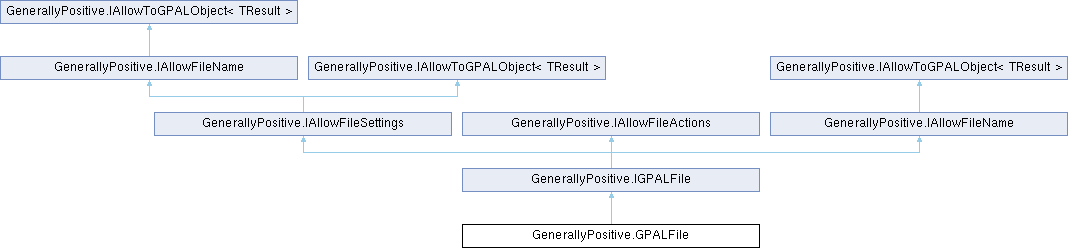
GPAL File object instantied with GPAL.File
Used to load tokens into a GPALGrid [rows/columns].
More...
Public Member Functions | |
| GPALFile | ToGPALObject () |
| Returns this GPALFile instance, allowing it to be passed where a generic GPAL object is expected. | |
| IAllowFileSettings | WithOverwriteFile (bool overwriteFile=false) |
| Sets whether the destination file(s) should be overwritten or a new filename should be generated (used by Next when iterating multiple output files). | |
| IAllowFileSettings | WithFileSortOrder (Enums.FileSortOrder fileSortOrder) |
Sets the order in which files matched by a wildcard pattern (e.g. *.csv) passed to WithFileName(string) are added to Filenames. Default is Enums.FileSortOrder.NameAscending (alphabetical). | |
| IAllowFileSettings | WithNextFilePattern (Enums.NextFilePattern nextFilePattern=Enums.NextFilePattern.CounterPadded) |
Sets how Next builds a new, unique filename when it needs one (the target file already exists, or Next is called past the user-supplied filenames). Default is Enums.NextFilePattern.CounterPadded (a zero-padded _001 suffix). | |
| IAllowFileSettings | WithDelimiter (char delimiter) |
| THe character delimiting each token in the row (columns). | |
| IAllowFileSettings | WithColumnsEnclosedInQuotes (bool fieldsInQuotes) |
| Specifies whether each field (column value) in the file is enclosed in quotes. Applies to flat files (csv, txt, prn). | |
| IAllowFileSettings | WithFirstLineIsColumnNames (bool firstLineIsColumnNames) |
| Specifies that the first line of the file contains column header names. | |
| IAllowFileSettings | WithIgnoreFirstLineColumnNames (bool ignoreFirstLine=true) |
| Specifies that the first line of the file (a column header row) should be ignored/skipped when reading tokens. | |
| IAllowFileSettings | WithUseSameColumnNamesForAllFiles (bool useHeaderForAllFiles) |
| Specifies that a single column name list has been defined and should be reused for every file in the file list, rather than requiring a separate column list per file. | |
| IAllowFileSettings | WithBrowser (Browser.IBrowser browser) |
| The browser whose session can reach a url that our own connection cannot, for a file behind a login or an anti-bot check. Has to be set before .WithFileName, since that is where the fetch happens. GPAL still tries its own connection first, which is cheap and works for anything public; the browser is the fallback. The file is downloaded in a new tab so the workflow's own page is left where it was. | |
| IAllowFileSettings | WithFileName (string fileName) |
| The filename to load input tokens from. An http or https address is fetched to a local file in the working directory and that file is used from then on, so a url can be handed to anything that takes a GPALFile without the workflow downloading it first. The fetch happens here rather than at read time, so a chain that names a url is doing the network call where you can see it, not somewhere later. | |
| IAllowFileSettings | WithColumnName (string columnName) |
| .WithColumnName adds columns to the same 'most recent' column list. NOTE: .WithColumnNameS allows You to define a column list for each supplied filename. NOTE: If you use .WithColumnNameS, a new blank column list row is added to use with .WithColumn | |
| IAllowFileSettings | WithColumnNames (string columnNames) |
| Add column names to the column name list using the .WithDelimiter to separate names. Use this to add column headers for multiple filenames. NOTE: If more filenames exists than column name lists, the file will have no column header row. NOTE: .WithUseHeaderForAllFiles will use the first column name list for all files. | |
| IAllowFileSettings | WithColumnNames (string[] columnNames) |
| Add column names to the column name list using the .WithDelimiter to separate names. Use this to add column headers for multiple filenames. NOTE: If more filenames exists than column name lists, the file will have no column header row. NOTE: .WithUseHeaderForAllFiles will use the first column name list for all files. | |
| void | CopyTo (string destination) |
| Copies each file in Filenames to destination . If destination is a directory (per IsDirectoryOnly(string)), each matched file is copied into that directory under its own name; otherwise all matched files are copied to the single destination path. Errors are reported via GPAL.PublishSimpleEvent rather than thrown. | |
| void | MoveTo (string destination) |
| Moves each file in Filenames to destination . If destination is a directory (per IsDirectoryOnly(string)), each matched file is moved into that directory under its own name; otherwise all matched files are moved to the single destination path. Errors are reported via GPAL.PublishSimpleEvent rather than thrown. | |
| void | Delete (string destination) |
| Deletes the file at destination , or if it is a directory (per IsDirectoryOnly(string)), deletes every file directly within that directory. Errors are reported via GPAL.PublishSimpleEvent rather than thrown. | |
| void | Delete () |
| Deletes every file in Filenames. Errors are reported via GPAL.PublishSimpleEvent rather than thrown. | |
Static Public Member Functions | |
| static implicit | operator string (GPALFile url) |
| Implicit conversion operator from GPALFile to string, returning Filename. Allows a GPALFile to be used directly wherever a filename string is expected. | |
| static implicit | operator GPALFile (string fileName) |
| Implicit conversion operator from string to GPALFile. Allows passing a filename string directly to methods expecting GPALFile/GPALFile. | |
Properties | |
| string | First [get] |
| Returns the first filename in Filenames and resets the Next cursor so that a subsequent call to Next returns the second filename. | |
| string | Last [get] |
| Returns the last filename in Filenames and positions the Next cursor at that filename so that a subsequent call to Next generates a new filename. | |
| GPALFile | Next [get] |
| Advances an internal cursor and returns the next filename to use. If there is exactly one file and WithOverwriteFile(bool) is true for it, that same filename is returned repeatedly. Otherwise, while unread filenames remain in Filenames, those are returned in order. Once the list is exhausted, a new filename is generated from the first filename's pattern via FileHelper.CleanUpFileDestination(string, out string, bool), appended to Filenames, and returned - allowing repeated calls to Next to keep producing new output filenames. | |
| string | Filename [get] |
| We have only one file, accessing it. | |
| List< string > | DirectoryParts [get] |
| The folder of every filename, in the same order as Filenames, so a wildcard that matched across folders still lines up one to one. | |
| List< string > | FileParts [get] |
| The name and extension of every filename, without its folder, in the same order as Filenames. | |
| string | DirectoryPart [get] |
| The folder of the first filename, since most files are singular. Same shortcut Filename is to Filenames. | |
| string | FilePart [get] |
| The name and extension of the first filename, without its folder. Useful for putting the same name in a different folder, for instance keeping a copy of a downloaded file somewhere that is not disposable. | |
| List< string > | Filenames [get] |
| Get the list of filenames. | |
| List< string > | ReturnFilenames [get] |
| Get the list of filenames saved to (returned). | |
| string | SourceUrl [get] |
| The url this file was fetched from, when .WithFileName was given one. Null for a file that was already on disk. Kept so a workflow can tell a downloaded file from a local one, and knows what it is a copy of. | |
| int | Count [get] |
| The number of filenames in Filenames. | |
GPAL File object instantied with GPAL.File
Used to load tokens into a GPALGrid [rows/columns].
Definition at line 35 of file GPALFile.cs.
| void GenerallyPositive.GPALFile.CopyTo | ( | string | destination | ) |
Copies each file in Filenames to destination . If destination is a directory (per IsDirectoryOnly(string)), each matched file is copied into that directory under its own name; otherwise all matched files are copied to the single destination path. Errors are reported via GPAL.PublishSimpleEvent rather than thrown.
| destination | The destination file path or directory. |
Implements GenerallyPositive.IAllowFileActions.
Definition at line 733 of file GPALFile.cs.
| void GenerallyPositive.GPALFile.Delete | ( | ) |
Deletes every file in Filenames. Errors are reported via GPAL.PublishSimpleEvent rather than thrown.
Implements GenerallyPositive.IAllowFileActions.
Definition at line 828 of file GPALFile.cs.
| void GenerallyPositive.GPALFile.Delete | ( | string | destination | ) |
Deletes the file at destination , or if it is a directory (per IsDirectoryOnly(string)), deletes every file directly within that directory. Errors are reported via GPAL.PublishSimpleEvent rather than thrown.
| destination | The file or directory to delete. |
Implements GenerallyPositive.IAllowFileActions.
Definition at line 799 of file GPALFile.cs.
| void GenerallyPositive.GPALFile.MoveTo | ( | string | destination | ) |
Moves each file in Filenames to destination . If destination is a directory (per IsDirectoryOnly(string)), each matched file is moved into that directory under its own name; otherwise all matched files are moved to the single destination path. Errors are reported via GPAL.PublishSimpleEvent rather than thrown.
| destination | The destination file path or directory. |
Implements GenerallyPositive.IAllowFileActions.
Definition at line 767 of file GPALFile.cs.
|
static |
Implicit conversion operator from string to GPALFile. Allows passing a filename string directly to methods expecting GPALFile/GPALFile.
| fileName | The filename or path to use. |
Definition at line 929 of file GPALFile.cs.
|
static |
Implicit conversion operator from GPALFile to string, returning Filename. Allows a GPALFile to be used directly wherever a filename string is expected.
| url | The GPALFile to convert. |
Definition at line 919 of file GPALFile.cs.
| GPALFile GenerallyPositive.GPALFile.ToGPALObject | ( | ) |
Returns this GPALFile instance, allowing it to be passed where a generic GPAL object is expected.
Implements GenerallyPositive.IAllowToGPALObject< TResult >.
Definition at line 48 of file GPALFile.cs.
| IAllowFileSettings GenerallyPositive.GPALFile.WithBrowser | ( | Browser.IBrowser | browser | ) |
The browser whose session can reach a url that our own connection cannot, for a file behind a login or an anti-bot check.
Has to be set before .WithFileName, since that is where the fetch happens. GPAL still tries its own connection first, which is cheap and works for anything public; the browser is the fallback. The file is downloaded in a new tab so the workflow's own page is left where it was.
| browser | A browser already holding the session the url needs |
Implements GenerallyPositive.IAllowFileName.
Definition at line 180 of file GPALFile.cs.
| IAllowFileSettings GenerallyPositive.GPALFile.WithColumnName | ( | string | columnName | ) |
.WithColumnName adds columns to the same 'most recent' column list. NOTE: .WithColumnNameS allows You to define a column list for each supplied filename. NOTE: If you use .WithColumnNameS, a new blank column list row is added to use with .WithColumn
| columnName | The column name to append to the current file's column name list. |
Implements GenerallyPositive.IAllowFileSettings.
Definition at line 292 of file GPALFile.cs.
| IAllowFileSettings GenerallyPositive.GPALFile.WithColumnNames | ( | string | columnNames | ) |
Add column names to the column name list using the .WithDelimiter to separate names. Use this to add column headers for multiple filenames. NOTE: If more filenames exists than column name lists, the file will have no column header row. NOTE: .WithUseHeaderForAllFiles will use the first column name list for all files.
| columnNames | A comma-delimited string of column names. |
Implements GenerallyPositive.IAllowFileSettings.
Definition at line 311 of file GPALFile.cs.
| IAllowFileSettings GenerallyPositive.GPALFile.WithColumnNames | ( | string[] | columnNames | ) |
Add column names to the column name list using the .WithDelimiter to separate names. Use this to add column headers for multiple filenames. NOTE: If more filenames exists than column name lists, the file will have no column header row. NOTE: .WithUseHeaderForAllFiles will use the first column name list for all files.
| columnNames | One column name per array element. |
Implements GenerallyPositive.IAllowFileSettings.
Definition at line 341 of file GPALFile.cs.
| IAllowFileSettings GenerallyPositive.GPALFile.WithColumnsEnclosedInQuotes | ( | bool | fieldsInQuotes | ) |
Specifies whether each field (column value) in the file is enclosed in quotes. Applies to flat files (csv, txt, prn).
| fieldsInQuotes | True if fields are enclosed in quotes. |
Implements GenerallyPositive.IAllowFileSettings.
Definition at line 125 of file GPALFile.cs.
| IAllowFileSettings GenerallyPositive.GPALFile.WithDelimiter | ( | char | delimiter | ) |
THe character delimiting each token in the row (columns).
| delimeter | Character delimiter [default comma] |
Implements GenerallyPositive.IAllowFileSettings.
Definition at line 114 of file GPALFile.cs.
| IAllowFileSettings GenerallyPositive.GPALFile.WithFileName | ( | string | fileName | ) |
The filename to load input tokens from.
An http or https address is fetched to a local file in the working directory and that file is used from then on, so a url can be handed to anything that takes a GPALFile without the workflow downloading it first. The fetch happens here rather than at read time, so a chain that names a url is doing the network call where you can see it, not somewhere later.
| fileName | The filename, wildcard pattern, or an http/https url |
Implements GenerallyPositive.IAllowFileName.
Definition at line 202 of file GPALFile.cs.
| IAllowFileSettings GenerallyPositive.GPALFile.WithFileSortOrder | ( | Enums.FileSortOrder | fileSortOrder | ) |
Sets the order in which files matched by a wildcard pattern (e.g. *.csv) passed to WithFileName(string) are added to Filenames. Default is Enums.FileSortOrder.NameAscending (alphabetical).
| fileSortOrder | The order in which to sort wildcard-matched files. |
Implements GenerallyPositive.IAllowFileSettings.
Definition at line 92 of file GPALFile.cs.
| IAllowFileSettings GenerallyPositive.GPALFile.WithFirstLineIsColumnNames | ( | bool | firstLineIsColumnNames | ) |
Specifies that the first line of the file contains column header names.
| firstLineIsColumnNames | True if the first line of the file is a column header row. |
Implements GenerallyPositive.IAllowFileSettings.
Definition at line 135 of file GPALFile.cs.
| IAllowFileSettings GenerallyPositive.GPALFile.WithIgnoreFirstLineColumnNames | ( | bool | ignoreFirstLine = true | ) |
Specifies that the first line of the file (a column header row) should be ignored/skipped when reading tokens.
| ignoreFirstLine | True to ignore the first line of the file. Default true. |
Implements GenerallyPositive.IAllowFileSettings.
Definition at line 145 of file GPALFile.cs.
| IAllowFileSettings GenerallyPositive.GPALFile.WithNextFilePattern | ( | Enums.NextFilePattern | nextFilePattern = Enums::NextFilePattern::CounterPadded | ) |
Sets how Next builds a new, unique filename when it needs one (the target file already exists, or Next is called past the user-supplied filenames). Default is Enums.NextFilePattern.CounterPadded (a zero-padded _001 suffix).
| nextFilePattern | The naming pattern used to make each generated filename unique. |
Implements GenerallyPositive.IAllowFileSettings.
Definition at line 104 of file GPALFile.cs.
| IAllowFileSettings GenerallyPositive.GPALFile.WithOverwriteFile | ( | bool | overwriteFile = false | ) |
Sets whether the destination file(s) should be overwritten or a new filename should be generated (used by Next when iterating multiple output files).
| overwriteFile | True to overwrite the existing file; false to generate a new filename. Default false. |
Implements GenerallyPositive.IAllowFileSettings.
Definition at line 80 of file GPALFile.cs.
| IAllowFileSettings GenerallyPositive.GPALFile.WithUseSameColumnNamesForAllFiles | ( | bool | useHeaderForAllFiles | ) |
Specifies that a single column name list has been defined and should be reused for every file in the file list, rather than requiring a separate column list per file.
| useHeaderForAllFiles | True to use the first column name list for all files. |
Implements GenerallyPositive.IAllowFileSettings.
Definition at line 156 of file GPALFile.cs.
|
get |
The number of filenames in Filenames.
Implements GenerallyPositive.IGPALFile.
Definition at line 719 of file GPALFile.cs.
|
get |
The folder of the first filename, since most files are singular. Same shortcut Filename is to Filenames.
Implements GenerallyPositive.IGPALFile.
Definition at line 504 of file GPALFile.cs.
|
get |
The folder of every filename, in the same order as Filenames, so a wildcard that matched across folders still lines up one to one.
Implements GenerallyPositive.IGPALFile.
Definition at line 483 of file GPALFile.cs.
|
get |
We have only one file, accessing it.
Implements GenerallyPositive.IGPALFile.
Definition at line 467 of file GPALFile.cs.
|
get |
Get the list of filenames.
Implements GenerallyPositive.IGPALFile.
Definition at line 539 of file GPALFile.cs.
|
get |
The name and extension of the first filename, without its folder. Useful for putting the same name in a different folder, for instance keeping a copy of a downloaded file somewhere that is not disposable.
Implements GenerallyPositive.IGPALFile.
Definition at line 527 of file GPALFile.cs.
|
get |
The name and extension of every filename, without its folder, in the same order as Filenames.
Implements GenerallyPositive.IGPALFile.
Definition at line 493 of file GPALFile.cs.
|
get |
Returns the first filename in Filenames and resets the Next cursor so that a subsequent call to Next returns the second filename.
Implements GenerallyPositive.IGPALFile.
Definition at line 362 of file GPALFile.cs.
|
get |
Returns the last filename in Filenames and positions the Next cursor at that filename so that a subsequent call to Next generates a new filename.
Implements GenerallyPositive.IGPALFile.
Definition at line 379 of file GPALFile.cs.
|
get |
Advances an internal cursor and returns the next filename to use. If there is exactly one file and WithOverwriteFile(bool) is true for it, that same filename is returned repeatedly. Otherwise, while unread filenames remain in Filenames, those are returned in order. Once the list is exhausted, a new filename is generated from the first filename's pattern via FileHelper.CleanUpFileDestination(string, out string, bool), appended to Filenames, and returned - allowing repeated calls to Next to keep producing new output filenames.
Implements GenerallyPositive.IGPALFile.
Definition at line 400 of file GPALFile.cs.
|
get |
Get the list of filenames saved to (returned).
Implements GenerallyPositive.IGPALFile.
Definition at line 549 of file GPALFile.cs.
|
get |
The url this file was fetched from, when .WithFileName was given one. Null for a file that was already on disk.
Kept so a workflow can tell a downloaded file from a local one, and knows what it is a copy of.
Implements GenerallyPositive.IGPALFile.
Definition at line 561 of file GPALFile.cs.
 1.17.0