 |
GPAL - Generally Positive Automation Library v1.0
GPAL The Fluent Automation LIbrary
|
|
GPAL - Generally Positive Automation Library v1.0
GPAL The Fluent Automation LIbrary
|
Provides configurable logging to a file (in any format supported by GPALConverter) or to a GPALDatabase. Configuration is performed via a fluent interface (IAllowLoggingSettings), allowing the root directory, directory structure, filename pattern, delimiter, log type, and date format to be set before calling Log(dynamic). Errors and warnings encountered while logging are reported via GPAL.PublishSimpleEvent rather than throwing exceptions. More...
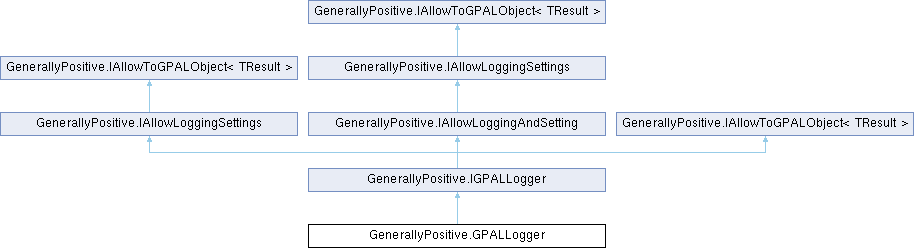
Public Member Functions | |
| IGPALLogger | ToGPALObject () |
| Returns this instance as an IGPALLogger, completing the fluent configuration chain. | |
| IAllowLoggingSettings | WithLogEventTypes (GPALEventType logEventTypes) |
| Which event types this logger writes. Anything outside the set is dropped, whether GPAL published it or the workflow called .Log itself, so turning the set down quiets debug logging without deleting a single call. Defaults to everything, so a logger that is never told stays as loud as it always was. | |
| IAllowLoggingSettings | WithDatabase (GPALDatabase database) |
| Configures the logger to write log entries to a GPALDatabase instead of a file. When set, Log(dynamic) writes via GPALConverter.SaveTo(GPALDatabase) instead of to a file on disk. | |
| IAllowLoggingSettings | WithRootDirectory (string path) |
| Sets the root directory under which log files are written. Subdirectories may be appended below this based on WithDirectoryStructure(DirectoryStructure). Defaults to the current working directory. | |
| IAllowLoggingSettings | WithDirectoryStructure (DirectoryStructure type) |
| Sets the directory structure (e.g. year/month/day) created beneath the root directory for log files. The required directories are created automatically when a log entry is written. | |
| IAllowLoggingSettings | WithFilename (string name) |
| Sets the base filename (including extension) used for log files. The extension determines the output DataFormat used by GPALConverter when writing log entries. | |
| IAllowLoggingSettings | WithFilenamePattern (FilenamePattern pattern) |
| Sets a timestamp pattern that is appended to the filename (before the extension) each time a log file path is computed, allowing log files to be split by time period (e.g. one file per day). | |
| IAllowLoggingSettings | WithDelimiter (char delimiter) |
| Sets the field delimiter used when writing log entries to a delimited text format. Also configures the underlying GPALConverter's input delimiter to match. | |
| IAllowLoggingSettings | WithLoggingFormat (LogDateFormat logDateFormat) |
| Sets the date/time format applied to the timestamp prepended to each log entry by Log(dynamic). If not set, LogDateFormat.MDY_HMS is used. | |
Static Public Member Functions | |
| static string | GetFormatString (LogDateFormat format) |
| Translates a LogDateFormat value into the corresponding DateTime format string. | |
Properties | |
| string | LogDirectory [get] |
| The folder the last entry was written to, with DirectoryStructure applied, e.g. logs\231. Null until something has been logged to a file. | |
| string | LogFilename [get] |
| The name of the file the last entry was written to, with FilenamePattern applied, e.g. DeadMikes_20260819.log. Null until something has been logged to a file. | |
| string | LogFullPath [get] |
| LogDirectory and LogFilename joined: the file the last entry went into. Null until something has been logged to a file. | |
Provides configurable logging to a file (in any format supported by GPALConverter) or to a GPALDatabase. Configuration is performed via a fluent interface (IAllowLoggingSettings), allowing the root directory, directory structure, filename pattern, delimiter, log type, and date format to be set before calling Log(dynamic). Errors and warnings encountered while logging are reported via GPAL.PublishSimpleEvent rather than throwing exceptions.
Definition at line 46 of file GPALLogger.cs.
|
static |
Translates a LogDateFormat value into the corresponding DateTime format string.
| format | The log date format to translate. |
| ArgumentException | Thrown if format is not a recognized LogDateFormat value. |
Definition at line 408 of file GPALLogger.cs.
| IGPALLogger GenerallyPositive.GPALLogger.ToGPALObject | ( | ) |
Returns this instance as an IGPALLogger, completing the fluent configuration chain.
Implements GenerallyPositive.IAllowToGPALObject< TResult >.
Definition at line 85 of file GPALLogger.cs.
| IAllowLoggingSettings GenerallyPositive.GPALLogger.WithDatabase | ( | GPALDatabase | database | ) |
Configures the logger to write log entries to a GPALDatabase instead of a file. When set, Log(dynamic) writes via GPALConverter.SaveTo(GPALDatabase) instead of to a file on disk.
| database | The database to log entries to. |
Implements GenerallyPositive.IAllowLoggingSettings.
Definition at line 121 of file GPALLogger.cs.
| IAllowLoggingSettings GenerallyPositive.GPALLogger.WithDelimiter | ( | char | delimiter | ) |
Sets the field delimiter used when writing log entries to a delimited text format. Also configures the underlying GPALConverter's input delimiter to match.
| delimiter | The character used to separate fields in each log entry. |
Implements GenerallyPositive.IAllowLoggingSettings.
Definition at line 179 of file GPALLogger.cs.
| IAllowLoggingSettings GenerallyPositive.GPALLogger.WithDirectoryStructure | ( | DirectoryStructure | type | ) |
Sets the directory structure (e.g. year/month/day) created beneath the root directory for log files. The required directories are created automatically when a log entry is written.
| type | The directory structure to use. |
Implements GenerallyPositive.IAllowLoggingSettings.
Definition at line 144 of file GPALLogger.cs.
| IAllowLoggingSettings GenerallyPositive.GPALLogger.WithFilename | ( | string | name | ) |
Sets the base filename (including extension) used for log files. The extension determines the output DataFormat used by GPALConverter when writing log entries.
| name | The base filename, including extension (e.g. "app.log"). |
Implements GenerallyPositive.IAllowLoggingSettings.
Definition at line 156 of file GPALLogger.cs.
| IAllowLoggingSettings GenerallyPositive.GPALLogger.WithFilenamePattern | ( | FilenamePattern | pattern | ) |
Sets a timestamp pattern that is appended to the filename (before the extension) each time a log file path is computed, allowing log files to be split by time period (e.g. one file per day).
| pattern | The timestamp pattern to append to the filename. |
Implements GenerallyPositive.IAllowLoggingSettings.
Definition at line 168 of file GPALLogger.cs.
| IAllowLoggingSettings GenerallyPositive.GPALLogger.WithLogEventTypes | ( | GPALEventType | logEventTypes | ) |
Which event types this logger writes. Anything outside the set is dropped, whether GPAL published it or the workflow called .Log itself, so turning the set down quiets debug logging without deleting a single call.
Defaults to everything, so a logger that is never told stays as loud as it always was.
| logEventTypes | The event types to write |
Implements GenerallyPositive.IAllowLoggingSettings.
Definition at line 109 of file GPALLogger.cs.
| IAllowLoggingSettings GenerallyPositive.GPALLogger.WithLoggingFormat | ( | LogDateFormat | logDateFormat | ) |
Sets the date/time format applied to the timestamp prepended to each log entry by Log(dynamic). If not set, LogDateFormat.MDY_HMS is used.
| logDateFormat | The date/time format to use for log entry timestamps. |
Implements GenerallyPositive.IAllowLoggingSettings.
Definition at line 191 of file GPALLogger.cs.
| IAllowLoggingSettings GenerallyPositive.GPALLogger.WithRootDirectory | ( | string | path | ) |
Sets the root directory under which log files are written. Subdirectories may be appended below this based on WithDirectoryStructure(DirectoryStructure). Defaults to the current working directory.
| path | The root directory path for log files. |
Implements GenerallyPositive.IAllowLoggingSettings.
Definition at line 132 of file GPALLogger.cs.
|
get |
The folder the last entry was written to, with DirectoryStructure applied, e.g. logs\231. Null until something has been logged to a file.
Implements GenerallyPositive.IGPALLogger.
Definition at line 61 of file GPALLogger.cs.
|
get |
The name of the file the last entry was written to, with FilenamePattern applied, e.g. DeadMikes_20260819.log. Null until something has been logged to a file.
Implements GenerallyPositive.IGPALLogger.
Definition at line 66 of file GPALLogger.cs.
|
get |
LogDirectory and LogFilename joined: the file the last entry went into. Null until something has been logged to a file.
Implements GenerallyPositive.IGPALLogger.
Definition at line 71 of file GPALLogger.cs.
 1.17.0