 |
GPAL - Generally Positive Automation Library v1.0
GPAL The Fluent Automation LIbrary
|
|
GPAL - Generally Positive Automation Library v1.0
GPAL The Fluent Automation LIbrary
|
Describes an API request for .Fetch to issue from inside the page, so it carries the session the browser has already earned: its cookies, its TLS fingerprint, its header order and any anti-bot clearance.
Built once and reused, the same way a Selector is. Where a Selector says how to find an element, this says what to ask the site's own API for.
More...
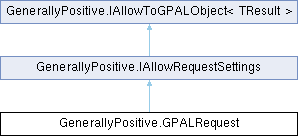
Public Member Functions | |
| GPALRequest | ToGPALObject () |
| Returns this request, so a chain can be assigned without an explicit cast. | |
| IAllowRequestSettings | WithPath (string path) |
| Path or full URL to request. A path such as "/api/search" is resolved against the origin the browser is already on, which is what a site proxying its own API needs. | |
| IAllowRequestSettings | WithHttpMethod (Enums.HttpVerb method) |
| HTTP method to use, for example GET, POST, PUT or DELETE. GET when nothing was said. | |
| IAllowRequestSettings | WithParameter (string nameValue) |
| Adds a query parameter, written as "name=value". Call once per parameter. | |
| IAllowRequestSettings | WithTokenFor (string parameterName) |
| Replaces the value of a query parameter with the next numbered token, so a request taken from a page can be varied without writing the url out again. The first call makes it {0}, the next {1}, matching the columns .WithTokensFrom supplies. | |
| IAllowRequestSettings | WithHeader (string nameValue) |
| Adds a request header, written as "Name: value". Call once per header. The browser sends its own headers regardless; these are added on top. | |
| IAllowRequestSettings | WithBody (string body) |
| Body to send, used as-is. Sets the content type to application/json unless .WithContentType says otherwise. | |
| IAllowRequestSettings | WithContentType (Enums.ContentType contentType) |
| Content type of the body. application/json when nothing was said. | |
| IAllowRequestSettings | WithFirstPage (int firstPage) |
| What this API calls its first page, which is what the page token counts on from. Zero for Algolia and most search backends, one for many others. Zero when nothing was said. | |
| IAllowRequestSettings | WithPageToken (string token="{page}") |
| The marker replaced with the page number, wherever it appears in the path, a parameter value, a header value or the body. Pick your own when the default would collide with the payload. | |
| IAllowRequestSettings | CallAfterFetch (Browser.Browser.CallAfterFetchDelegate callAfterFetch) |
| Called after each row of tokens has been fetched, with that row's pages, so the workflow can work the results while the rest are still being retrieved. Unlike a page of a web site, .Fetch knows exactly what it is going to do, so the handler is declared here on the request rather than on the browser. Return -1 to stop. | |
| IAllowToGPALObject< GPALRequest > | WithName (string name) |
| Names the request for messages and errors. Narrows the interface, so it goes last. | |
Properties | |
| string | Path [get, set] |
| Path or full URL to request. A path rides the origin the browser is already on. | |
| string | Method = "GET" [get, set] |
| HTTP method. GET when nothing was said. | |
| string | Body [get, set] |
| Request body, sent as-is. | |
| string | ContentType = "application/json" [get, set] |
| Content type of the body. | |
| List< KeyValuePair< string, string > > | Parameters = new List<KeyValuePair<string, string>>() [get, set] |
| Query parameters, in the order they were added. | |
| List< KeyValuePair< string, string > > | Headers = new List<KeyValuePair<string, string>>() [get, set] |
| Extra request headers, on top of whatever the browser sends for itself. | |
| int | FirstPage [get, set] |
| What the API calls its first page. Zero for Algolia and most search backends, one for many others. The page token counts on from here. | |
| string | PageToken = "{page}" [get, set] |
| Marks where the page number goes. Put it anywhere .Fetch sends: the path, a parameter value, a header value or the body. It is a plain substring replacement, so GPAL never parses or understands what it is being put into, which is what lets a JSON body, a form post or an XML payload all page the same way. Change it with .WithPageToken when the default would collide with the payload. | |
| Browser.Browser.CallAfterFetchDelegate | AfterFetch [get, set] |
| Called once per row of tokens, with that row's pages. Null when nothing was said. | |
| string | Name [get, set] |
| Name used in messages and errors. | |
Describes an API request for .Fetch to issue from inside the page, so it carries the session the browser has already earned: its cookies, its TLS fingerprint, its header order and any anti-bot clearance.
Built once and reused, the same way a Selector is. Where a Selector says how to find an element, this says what to ask the site's own API for.
Tokens are numbered to match the columns of whatever .WithTokensFrom was given, so {0} is the first column of the row, {1} the second, and so on. They are plain substring replacements and work anywhere .Fetch sends: the path, a parameter value, a header value or the body. Nothing here parses what it is writing into.
Definition at line 76 of file GPALRequest.cs.
| IAllowRequestSettings GenerallyPositive.GPALRequest.CallAfterFetch | ( | Browser.Browser.CallAfterFetchDelegate | callAfterFetch | ) |
Called after each row of tokens has been fetched, with that row's pages, so the workflow can work the results while the rest are still being retrieved. Unlike a page of a web site, .Fetch knows exactly what it is going to do, so the handler is declared here on the request rather than on the browser.
Return -1 to stop.
| callAfterFetch | Handler to call once per row of tokens |
Implements GenerallyPositive.IAllowRequestSettings.
Definition at line 291 of file GPALRequest.cs.
| GPALRequest GenerallyPositive.GPALRequest.ToGPALObject | ( | ) |
Returns this request, so a chain can be assigned without an explicit cast.
Implements GenerallyPositive.IAllowToGPALObject< TResult >.
Definition at line 122 of file GPALRequest.cs.
| IAllowRequestSettings GenerallyPositive.GPALRequest.WithBody | ( | string | body | ) |
Body to send, used as-is. Sets the content type to application/json unless .WithContentType says otherwise.
| body | Request body |
Implements GenerallyPositive.IAllowRequestSettings.
Definition at line 242 of file GPALRequest.cs.
| IAllowRequestSettings GenerallyPositive.GPALRequest.WithContentType | ( | Enums.ContentType | contentType | ) |
Content type of the body. application/json when nothing was said.
| contentType | Content type |
Implements GenerallyPositive.IAllowRequestSettings.
Definition at line 253 of file GPALRequest.cs.
| IAllowRequestSettings GenerallyPositive.GPALRequest.WithFirstPage | ( | int | firstPage | ) |
What this API calls its first page, which is what the page token counts on from. Zero for Algolia and most search backends, one for many others. Zero when nothing was said.
| firstPage | Number of the first page |
Implements GenerallyPositive.IAllowRequestSettings.
Definition at line 265 of file GPALRequest.cs.
| IAllowRequestSettings GenerallyPositive.GPALRequest.WithHeader | ( | string | nameValue | ) |
Adds a request header, written as "Name: value". Call once per header. The browser sends its own headers regardless; these are added on top.
| nameValue | Header as "Name: value" |
Implements GenerallyPositive.IAllowRequestSettings.
Definition at line 230 of file GPALRequest.cs.
| IAllowRequestSettings GenerallyPositive.GPALRequest.WithHttpMethod | ( | Enums.HttpVerb | method | ) |
HTTP method to use, for example GET, POST, PUT or DELETE. GET when nothing was said.
| method | HTTP method |
Implements GenerallyPositive.IAllowRequestSettings.
Definition at line 144 of file GPALRequest.cs.
| IAllowToGPALObject< GPALRequest > GenerallyPositive.GPALRequest.WithName | ( | string | name | ) |
Names the request for messages and errors. Narrows the interface, so it goes last.
| name | Name of the request |
Implements GenerallyPositive.IAllowRequestSettings.
Definition at line 302 of file GPALRequest.cs.
| IAllowRequestSettings GenerallyPositive.GPALRequest.WithPageToken | ( | string | token = "{page}" | ) |
The marker replaced with the page number, wherever it appears in the path, a parameter value, a header value or the body. Pick your own when the default would collide with the payload.
| token | Marker to replace. [{page} (default)] |
Implements GenerallyPositive.IAllowRequestSettings.
Definition at line 277 of file GPALRequest.cs.
| IAllowRequestSettings GenerallyPositive.GPALRequest.WithParameter | ( | string | nameValue | ) |
Adds a query parameter, written as "name=value". Call once per parameter.
| nameValue | Parameter as "name=value" |
Implements GenerallyPositive.IAllowRequestSettings.
Definition at line 155 of file GPALRequest.cs.
| IAllowRequestSettings GenerallyPositive.GPALRequest.WithPath | ( | string | path | ) |
Path or full URL to request. A path such as "/api/search" is resolved against the origin the browser is already on, which is what a site proxying its own API needs.
| path | Path or full URL |
Implements GenerallyPositive.IAllowRequestSettings.
Definition at line 133 of file GPALRequest.cs.
| IAllowRequestSettings GenerallyPositive.GPALRequest.WithTokenFor | ( | string | parameterName | ) |
Replaces the value of a query parameter with the next numbered token, so a request taken from a page can be varied without writing the url out again.
The first call makes it {0}, the next {1}, matching the columns .WithTokensFrom supplies.
Finds a named scalar, in a query parameter (?name=value, in the path or a form body) or a JSON field ("name": "value" or "name": 123). That covers most of what a site's own front end sends, and it does not cover everything:
/hotels/ABC/rooms. "roomIds":["A","B"]. None of that is a dead end. Tokens are only text, and .Fetch has always taken them anywhere in a path, parameter, header or body, so a shape this cannot reach is one you write the token into yourself:
| parameterName | Name of the query parameter or JSON field whose value becomes a token |
Implements GenerallyPositive.IAllowRequestSettings.
Definition at line 199 of file GPALRequest.cs.
|
getset |
Called once per row of tokens, with that row's pages. Null when nothing was said.
Definition at line 109 of file GPALRequest.cs.
|
getset |
Request body, sent as-is.
Definition at line 85 of file GPALRequest.cs.
|
getset |
Content type of the body.
Definition at line 88 of file GPALRequest.cs.
|
getset |
What the API calls its first page. Zero for Algolia and most search backends, one for many others. The page token counts on from here.
Definition at line 98 of file GPALRequest.cs.
|
getset |
Extra request headers, on top of whatever the browser sends for itself.
Definition at line 94 of file GPALRequest.cs.
|
getset |
HTTP method. GET when nothing was said.
Definition at line 82 of file GPALRequest.cs.
|
getset |
Name used in messages and errors.
Definition at line 112 of file GPALRequest.cs.
|
getset |
Marks where the page number goes. Put it anywhere .Fetch sends: the path, a parameter value, a header value or the body. It is a plain substring replacement, so GPAL never parses or understands what it is being put into, which is what lets a JSON body, a form post or an XML payload all page the same way. Change it with .WithPageToken when the default would collide with the payload.
Definition at line 106 of file GPALRequest.cs.
|
getset |
Query parameters, in the order they were added.
Definition at line 91 of file GPALRequest.cs.
|
getset |
Path or full URL to request. A path rides the origin the browser is already on.
Definition at line 79 of file GPALRequest.cs.
 1.17.0