 |
GPAL - Generally Positive Automation Library v1.0
GPAL The Fluent Automation LIbrary
|
|
GPAL - Generally Positive Automation Library v1.0
GPAL The Fluent Automation LIbrary
|
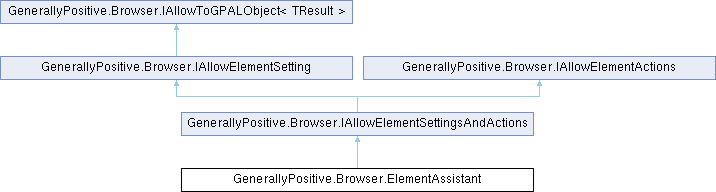
Browser ElementAssistant object with fluent methods to help you manipulate WebElements in Callback EventHandlers.
Instantiated with GPAL.ElementAssistant().
More...
Public Member Functions | |
| IAllowElementSettingsAndActions | LeftClick () |
| Left click the webelement, optionally emulating pressing a modifier key at the same time. | |
| IAllowElementSettingsAndActions | LeftClick (Enums.ModifierKeys modifierKeys) |
| Left click the webelement, optionally emulating pressing a modifier key at the same time. | |
| IAllowElementSettingsAndActions | LeftClick (IGPALElement webElement) |
| Left click the webelement, optionally emulating pressing a modifier key at the same time. | |
| IAllowElementSettingsAndActions | LeftClickAndDownload (IGPALElement webElement, GPALFile downloadTo) |
| Left click the webelement and download a file. | |
| IAllowElementSettingsAndActions | LeftDoubleClick () |
| Left double click the webelement. | |
| IAllowElementSettingsAndActions | LeftDoubleClick (IGPALElement webElement) |
| Left double click the webelement. | |
| IAllowElementSettingsAndActions | MiddleClick () |
| Left click the webelement, optionally emulating pressing a modifier key at the same time. | |
| IAllowElementSettingsAndActions | RightClick (IGPALElement webElement=null) |
| Right click the webelement. | |
| IAllowElementSettingsAndActions | WithElement (IGPALElement GPALElement) |
| Define the element to act upon. | |
| IAllowElementSettingsAndActions | FillInFrom (string inputText) |
| Fill In (Ovewrite) text of the input webelement defined with .WithElement. | |
| IAllowElementSettingsAndActions | InsertFrom (string inputText) |
| Insert text at the beginning of the input webelement defined with .WithElement. | |
| IAllowElementSettingsAndActions | AppendFrom (string inputText) |
| Appends text to the end of the input webelement defined with .WithElement. | |
| IAllowElementSettingsAndActions | SendKey (byte keyCode) |
| Emulate pressing a special key like Home, End, Page Down. Use GPAL.VK_ defined virual keycodes or send any you want to send. https://docs.microsoft.com/en-us/windows/win32/inputdev/virtual-key-codes. | |
| IAllowElementSettingsAndActions | SendString (string textToSend) |
| Send the string using hardware emulation. | |
| IAllowElementSettingsAndActions | PressModifierKey (ModifierKeys modifierKeys) |
| Press a modifier key: Alt, Control, Shift. | |
| IAllowElementSettingsAndActions | ReleaseModifierKey (ModifierKeys modifierKeys) |
| Release a modifier key: Alt, Control, Shift. | |
| IAllowElementSettingsAndActions | ScrollElementHorizontal (int scrollAmount) |
| Scroll the element horizontally by number of pixels. Negative numbers scroll left. JavaScript only. | |
| IAllowElementSettingsAndActions | ScrollElementVertical (int scrollAmount) |
| Scroll the element vertically by number of pixels. Negative numbers scroll up. JavaScript only. | |
| ElementAssistant | ToGPALObject () |
| Returns this ElementAssistant as itself. | |
| Public Member Functions inherited from GenerallyPositive.Browser.IAllowElementActions | |
| IAllowElementSettingsAndActions | LeftClick (ModifierKeys modifierKeys) |
Properties | |
| IAllowElementSettingsAndActions | WithJavaScript [get] |
| Interact with the webelement using javascript. | |
| IAllowElementSettingsAndActions | WithHardware [get] |
| Interact with the webelement using hardware emulation. | |
Browser ElementAssistant object with fluent methods to help you manipulate WebElements in Callback EventHandlers.
Instantiated with GPAL.ElementAssistant().
| browser | Browser object associated with the elements/callback |
Definition at line 51 of file ElementAssistant.cs.
| IAllowElementSettingsAndActions GenerallyPositive.Browser.ElementAssistant.AppendFrom | ( | string | inputText | ) |
Appends text to the end of the input webelement defined with .WithElement.
| inputText |
Implements GenerallyPositive.Browser.IAllowElementActions.
Definition at line 257 of file ElementAssistant.cs.
| IAllowElementSettingsAndActions GenerallyPositive.Browser.ElementAssistant.FillInFrom | ( | string | inputText | ) |
Fill In (Ovewrite) text of the input webelement defined with .WithElement.
| inputText |
Implements GenerallyPositive.Browser.IAllowElementActions.
Definition at line 213 of file ElementAssistant.cs.
| IAllowElementSettingsAndActions GenerallyPositive.Browser.ElementAssistant.InsertFrom | ( | string | inputText | ) |
Insert text at the beginning of the input webelement defined with .WithElement.
| inputText |
Implements GenerallyPositive.Browser.IAllowElementActions.
Definition at line 232 of file ElementAssistant.cs.
| IAllowElementSettingsAndActions GenerallyPositive.Browser.ElementAssistant.LeftClick | ( | ) |
Left click the webelement, optionally emulating pressing a modifier key at the same time.
| modifierKeys | Optional modifier key press |
Implements GenerallyPositive.Browser.IAllowElementActions.
Definition at line 92 of file ElementAssistant.cs.
| IAllowElementSettingsAndActions GenerallyPositive.Browser.ElementAssistant.LeftClick | ( | Enums.ModifierKeys | modifierKeys | ) |
Left click the webelement, optionally emulating pressing a modifier key at the same time.
| modifierKeys | Optional modifier key press |
Definition at line 104 of file ElementAssistant.cs.
| IAllowElementSettingsAndActions GenerallyPositive.Browser.ElementAssistant.LeftClick | ( | IGPALElement | webElement | ) |
Left click the webelement, optionally emulating pressing a modifier key at the same time.
| modifierKeys | Optional modifier key press |
Implements GenerallyPositive.Browser.IAllowElementActions.
Definition at line 117 of file ElementAssistant.cs.
| IAllowElementSettingsAndActions GenerallyPositive.Browser.ElementAssistant.LeftClickAndDownload | ( | IGPALElement | webElement, |
| GPALFile | downloadTo ) |
Left click the webelement and download a file.
| downloadTo | GPALFile to download to |
| webElement | The webelement to click from your CallIfFound handler |
Definition at line 132 of file ElementAssistant.cs.
| IAllowElementSettingsAndActions GenerallyPositive.Browser.ElementAssistant.LeftDoubleClick | ( | ) |
Left double click the webelement.
Definition at line 145 of file ElementAssistant.cs.
| IAllowElementSettingsAndActions GenerallyPositive.Browser.ElementAssistant.LeftDoubleClick | ( | IGPALElement | webElement | ) |
Left double click the webelement.
Implements GenerallyPositive.Browser.IAllowElementActions.
Definition at line 156 of file ElementAssistant.cs.
| IAllowElementSettingsAndActions GenerallyPositive.Browser.ElementAssistant.MiddleClick | ( | ) |
Left click the webelement, optionally emulating pressing a modifier key at the same time.
| modifierKeys | Optional modifier key press |
Implements GenerallyPositive.Browser.IAllowElementActions.
Definition at line 168 of file ElementAssistant.cs.
| IAllowElementSettingsAndActions GenerallyPositive.Browser.ElementAssistant.PressModifierKey | ( | ModifierKeys | modifierKeys | ) |
Press a modifier key: Alt, Control, Shift.
| modifierKeys | Alt, Control, Shift |
Implements GenerallyPositive.Browser.IAllowElementActions.
Definition at line 299 of file ElementAssistant.cs.
| IAllowElementSettingsAndActions GenerallyPositive.Browser.ElementAssistant.ReleaseModifierKey | ( | ModifierKeys | modifierKeys | ) |
Release a modifier key: Alt, Control, Shift.
| modifierKeys | Alt, Control, Shift |
Implements GenerallyPositive.Browser.IAllowElementActions.
Definition at line 318 of file ElementAssistant.cs.
| IAllowElementSettingsAndActions GenerallyPositive.Browser.ElementAssistant.RightClick | ( | IGPALElement | webElement = null | ) |
Right click the webelement.
Implements GenerallyPositive.Browser.IAllowElementActions.
Definition at line 179 of file ElementAssistant.cs.
| IAllowElementSettingsAndActions GenerallyPositive.Browser.ElementAssistant.ScrollElementHorizontal | ( | int | scrollAmount | ) |
Scroll the element horizontally by number of pixels.
Negative numbers scroll left. JavaScript only.
| scrollAmount | Positive integer scrolls right. Negative integer scolls left. |
Implements GenerallyPositive.Browser.IAllowElementActions.
Definition at line 337 of file ElementAssistant.cs.
| IAllowElementSettingsAndActions GenerallyPositive.Browser.ElementAssistant.ScrollElementVertical | ( | int | scrollAmount | ) |
Scroll the element vertically by number of pixels.
Negative numbers scroll up. JavaScript only.
| scrollAmount | Positive integer scrolls down. Negative integer scolls down. |
Implements GenerallyPositive.Browser.IAllowElementActions.
Definition at line 348 of file ElementAssistant.cs.
| IAllowElementSettingsAndActions GenerallyPositive.Browser.ElementAssistant.SendKey | ( | byte | keyCode | ) |
Emulate pressing a special key like Home, End, Page Down.
Use GPAL.VK_ defined virual keycodes or send any you want to send.
https://docs.microsoft.com/en-us/windows/win32/inputdev/virtual-key-codes.
| keyCode |
Implements GenerallyPositive.Browser.IAllowElementActions.
Definition at line 279 of file ElementAssistant.cs.
| IAllowElementSettingsAndActions GenerallyPositive.Browser.ElementAssistant.SendString | ( | string | textToSend | ) |
Send the string using hardware emulation.
| textToSend |
Implements GenerallyPositive.Browser.IAllowElementActions.
Definition at line 289 of file ElementAssistant.cs.
| ElementAssistant GenerallyPositive.Browser.ElementAssistant.ToGPALObject | ( | ) |
Returns this ElementAssistant as itself.
Implements GenerallyPositive.Browser.IAllowToGPALObject< TResult >.
Definition at line 374 of file ElementAssistant.cs.
| IAllowElementSettingsAndActions GenerallyPositive.Browser.ElementAssistant.WithElement | ( | IGPALElement | GPALElement | ) |
Define the element to act upon.
| GPALElement | The GPALElement to interact with |
Implements GenerallyPositive.Browser.IAllowElementSetting.
Definition at line 203 of file ElementAssistant.cs.
|
get |
Interact with the webelement using hardware emulation.
Implements GenerallyPositive.Browser.IAllowElementSetting.
Definition at line 79 of file ElementAssistant.cs.
|
get |
Interact with the webelement using javascript.
Implements GenerallyPositive.Browser.IAllowElementSetting.
Definition at line 67 of file ElementAssistant.cs.
 1.17.0